

Pregnancy App & Baby Tracker review
 Analysis by GetAllApps
I’d recommend BabyCenter as a reassuring companion for someone who wants pregnancy guidance organized around the week they are in, rather than a general collection of parenting articles. Its main appeal is the steady sense of progress: you can check in, see what is relevant now, and return to the same place as the pregnancy changes. It is free, and its popularity is striking, with an average rating of 4.9 from around 1.5 million ratings. That kind of reach suggests it has become a familiar resource for many families, though it does not mean every style of pregnancy support will suit every user.
Guidance that follows the pregnancy
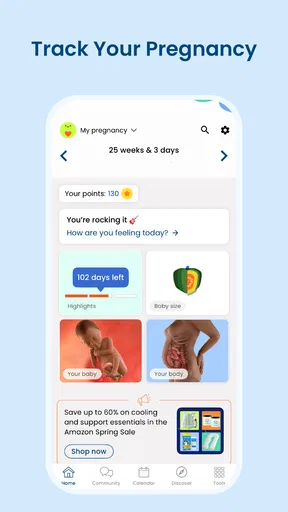
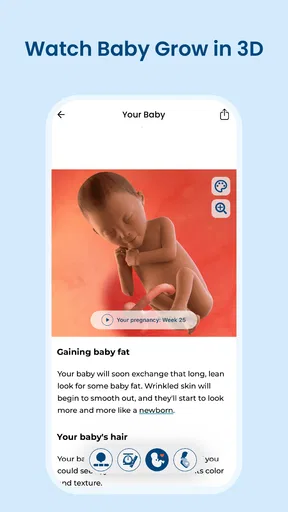
BabyCenter is a parenting app from BabyCenter, built around pregnancy and baby development. Rather than asking you to browse a broad library from scratch, it makes the current stage of pregnancy the natural starting point. That matters in everyday use: when you have a quick question between appointments, a week-focused guide is easier to navigate than a search page full of material for every stage at once.
The strongest idea here is continuity. Pregnancy can feel like a long stretch punctuated by appointments and sudden questions. A tracker gives that time a useful structure, while week-by-week material helps make changes feel less abstract. I would use it as a regular check-in, not as a source to consult only when something feels worrying. The former encourages informed curiosity; the latter can turn even a helpful article into a substitute for proper medical advice.
In practical terms, it suits small moments: reading a short update during a commute, checking what topics may be worth discussing at an upcoming appointment, or sharing an article with a partner who wants to understand what this stage might involve. The benefit is not that an app can predict exactly how one pregnancy will feel. It is that a well-timed explanation can help you frame better questions and feel less lost in a flood of unrelated search results.
Why the week-by-week format works
Many pregnancy resources are organized either as large reference libraries or as tools for recording appointments and symptoms. BabyCenter’s emphasis on development and growth gives it a different role: it turns the calendar into a reading path. That is especially useful for first-time parents, who may not yet know which subjects to look up or when a particular topic is likely to become relevant.
There is a small but valuable workflow tip here. Instead of trying to read everything in one sitting, I’d make the weekly check-in a cue to choose one question to bring to a clinician or discuss with a partner. That keeps the app from becoming a task list and makes its information more actionable. It also helps separate general education from decisions that depend on an individual’s health history.
A second useful approach is to treat the tracker as a shared conversation starter. A partner or family member can read the same stage-based material, then ask what kind of support would actually help that week. This is more practical than assuming a general article tells them what to do. Pregnancy experiences differ, and a guide is most useful when it opens a conversation rather than prescribing one.
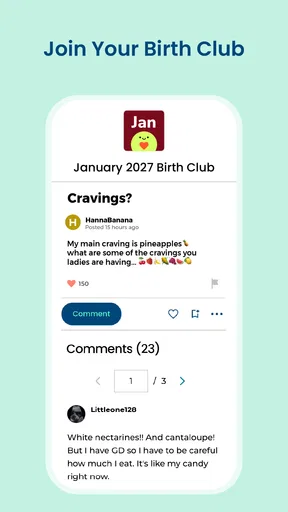
Its scale is another reason some readers may feel comfortable trying it: BabyCenter has more than 10 million installs and around 94,000 written reviews. Those figures are context, not proof that every article will answer every question. I would still judge an individual piece by whether it is clear, appropriately cautious, and relevant to the situation at hand.
Where it fits among pregnancy tools
Compared with a plain calendar or a notes app, a dedicated pregnancy tracker offers context rather than simply recording dates. Compared with a search engine, a week-based guide can reduce the effort of sorting through material meant for different stages. And compared with a clinic’s own patient resources, it is better understood as a convenient educational companion, not a replacement for advice tailored to your care.
That distinction is important. If your main need is keeping a detailed personal log, coordinating appointments, or managing health information, a separate tool designed specifically for those jobs may be a better fit. BabyCenter’s appeal is the pregnancy-centered reading experience and the sense of following development over time. I would not choose it on the assumption that it is a complete medical record or a clinician in your pocket.
There is also a trade-off in any week-by-week presentation: it can make the journey feel orderly, but real pregnancies do not always follow a tidy schedule. The material should be read as broad guidance rather than a checklist of what must happen on a particular day. If an update does not match your experience, that is not, by itself, a reason to panic. Personal concerns belong with a healthcare professional who knows your circumstances.
Limits worth keeping in mind
The biggest limitation is inherent in the format. An app can offer general explanations, but it cannot assess symptoms, account for your full medical history, or tell you what is normal for you personally. I would avoid using any pregnancy article to delay contacting a clinician about a concerning symptom. This is a useful distinction for anxious readers, who may find that searching repeatedly for reassurance makes worry worse rather than better.
Another possible friction point is that a steady stream of stage-related content may not suit someone who prefers minimal reminders and only wants information when they ask for it. If you find frequent pregnancy content emotionally tiring, a simpler calendar and direct conversations with your care team may feel calmer. A tracker is helpful only when its structure supports you; it should not become another source of pressure to read, compare, or keep up.
It is also worth remembering that an average rating, however high, reflects a broad audience rather than a promise about your own experience. People arrive with different expectations: some want a weekly guide, others want highly individualized medical information. BabyCenter is strongest when used for orientation and general learning. It is less suitable when you need a personalized answer or a tool built around clinical tracking.
The app is free, which makes it easy to try without treating it as a major commitment. Its content rating is Teen, so it is not positioned as an adults-only product. On Android, the listed minimum operating system is version 8.0, and the current version is 6.17.0. It was released on March 11, 2011, giving it a long history as a pregnancy resource, although longevity alone should not determine whether its approach matches your needs.
Who is most likely to benefit
I think BabyCenter is a good fit for expectant parents who want an approachable weekly routine, particularly people who are new to pregnancy and do not know where to begin. It can also help a partner who wants a simple way to follow along and understand what subjects may be worth discussing. The most useful readers will be curious but discerning: willing to learn from general guidance while checking personal medical questions with a professional.
Consider an ordinary evening before an appointment. You open the app for a quick update, notice a topic you had not thought to ask about, and jot down a question to raise the next day. That is a realistic, low-pressure use. The app has done its job if it helps you prepare for a better conversation, not if it convinces you to diagnose yourself from a screen.
I would steer away from it if you want a highly technical reference, a bespoke care plan, or a comprehensive system for recording every aspect of health. It may also be a poor choice for someone who finds pregnancy content overwhelming and would rather keep digital reminders to a minimum. In those cases, a clinician’s materials, a focused tracking tool, or a basic calendar could be more comfortable.
A practical way to use it
To get the most from the week-by-week structure, I’d set a modest boundary: check the current guide when it suits you, pick out information that is genuinely useful, and leave the rest. Keep urgent concerns out of the app-reading loop. If an article raises a question about your own care, write it down and ask your healthcare provider rather than searching through multiple pages for a definitive answer.
This approach also avoids a common trap with pregnancy trackers: comparing your experience too closely with a generalized timeline. A guide can explain what may be happening in broad terms, but it is not a scorecard. Using it as a prompt for curiosity, preparation, and shared understanding preserves its strengths without asking it to do work it cannot do.
Because the app centers on pregnancy, its usefulness may change as your needs do. Someone who begins with weekly development updates might later prefer resources focused on newborn care or a different kind of family organization. That is not a failure of the app; it is a reminder to reassess whether its main purpose still matches the questions you are asking.
My verdict
BabyCenter earns a place on my shortlist for anyone who wants pregnancy information arranged around the stage they are experiencing. Its clear strength is making regular learning feel manageable, and its free access lowers the barrier to trying that routine. The large community of users and strong average rating add reassurance that it has broad appeal, but I would choose it for its practical week-by-week framing, not because popularity guarantees a perfect fit.
My recommendation is to use BabyCenter as a calm educational companion, not as a medical authority. If you enjoy checking in regularly, want help forming questions, or need a shared reference point with a partner, it is a sensible option. If you need personalized clinical guidance, detailed health logging, or less pregnancy-related content in your day, another resource will serve you better. Used with those boundaries, it can make the long timeline of pregnancy feel easier to follow without pretending that every family’s experience is the same.
Pros and cons
Pros
- Tracks pregnancy progress by week with helpful development updates.
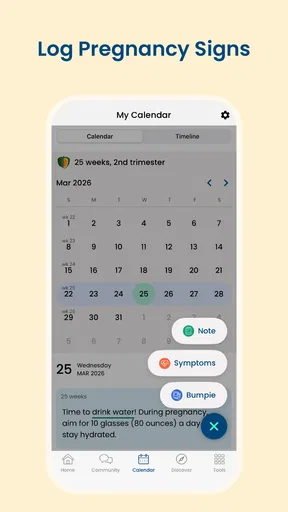
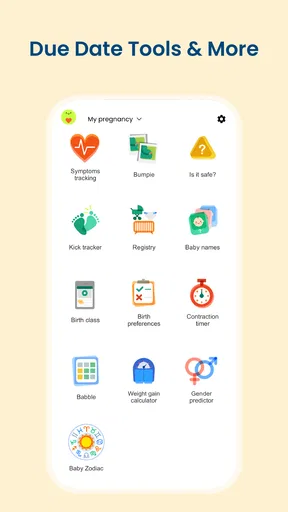
- Includes tools for logging symptoms and appointments.
- Baby tracking features support feeding and diaper records after birth.
- Customizable reminders can help keep important tasks on schedule.
- A simple layout makes common tracking features easy to find.
Cons
- Some features may require a paid subscription.
- Personal health data may be sensitive for some users.
- Tracking details depend on users entering information regularly.
- Pregnancy estimates are informational and may not match clinical assessments.
- The app cannot replace guidance from a qualified healthcare professional.


